Viewing Employee Leave Balance Data
1. Login to Hour Timesheet
- Navigate to My Timesheet menu
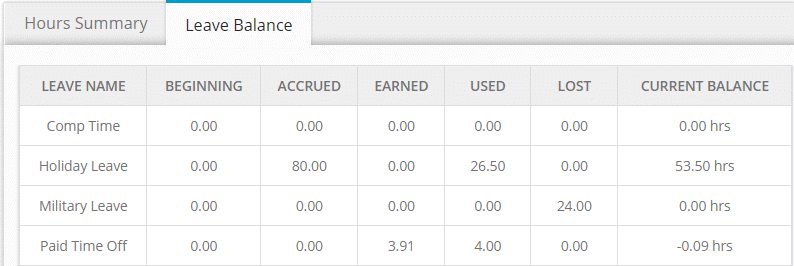
- Click the Leave Balance tab (see screenshot)
Additional leave balance notes
Balance is reduced after timesheet is submitted at the end of each timesheet period.
User may be allowed to “go into the negative” if feature is configured.
System will stop accruing leave once limit “ceiling” is reached. Additional leave earned or accrued after leave ceiling is reached is moved to the “lost” column.
Request Leave
- Navigate to Request Leave menu
- Click Create New Leave Request
- Complete the form
- Click OK
